

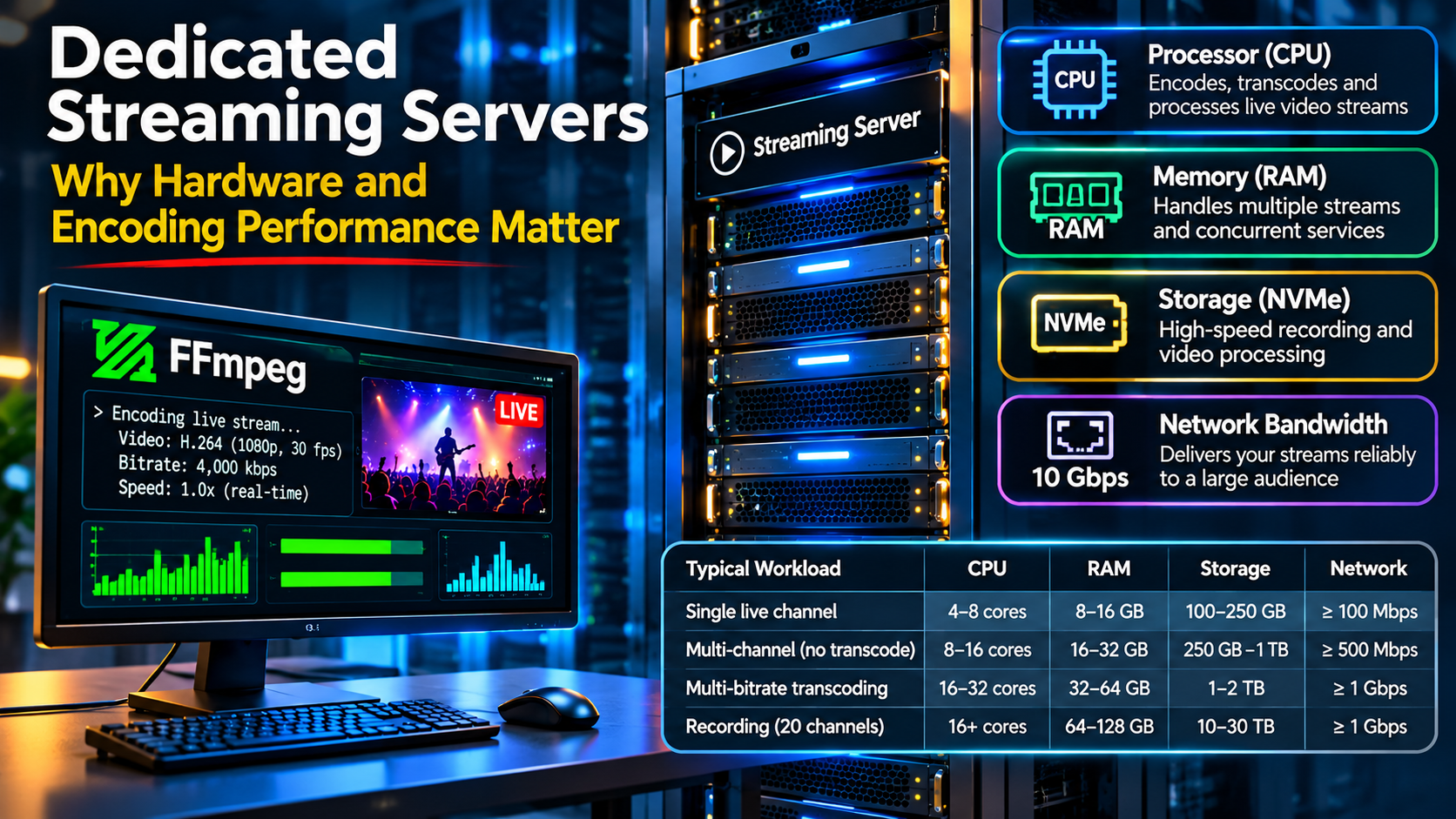
When broadcasters compare dedicated streaming servers, the first specifications they usually notice are processor speed, RAM, storage capacity and network connectivity.
A server with 32 CPU threads, 128 GB of RAM and a 10 Gbps network port certainly looks powerful. But does that mean it can support hundreds of television channels or thousands of simultaneous viewers?
Not necessarily.
The performance of a dedicated streaming server depends on what the server is actually doing. Receiving live broadcasts, transcoding video, recording programmes and distributing streams to viewers are different operations, each placing different demands on the hardware.
Understanding these differences can help broadcasters avoid paying for resources they do not need while ensuring sufficient capacity for future growth.
1. The Processor: Why CPU Performance Matters
The processor is one of the most important components in a streaming server, particularly when video transcoding is involved.
Consider two different broadcasting operations.
In the first scenario, a television station sends an H.264 video stream to a dedicated server using RTMP. The server receives the stream and makes it available for HLS playback without re-encoding the video.
In the second scenario, the same server receives a 1080p broadcast and creates additional 720p, 480p and 360p versions for adaptive bitrate delivery.
The second operation requires considerably more processing power.
Each additional output may involve decoding, resizing and encoding video frames continuously.
For this reason, a server handling 50 streams without transcoding can sometimes require less CPU power than one transcoding five demanding video streams.
The actual difference depends on codecs, resolutions, frame rates, encoding settings and hardware acceleration.
CPU cores versus clock speed
Modern server processors offer different combinations of core count, clock speed and architecture.
A processor with many cores can be useful when running numerous independent FFmpeg encoding jobs.
However, processors with fewer but faster cores may perform better for certain workloads, particularly when individual encoding processes cannot efficiently use all available threads.
Processor generation also matters. A newer CPU may deliver better encoding performance than an older processor with a similar clock speed.
Therefore, broadcasters should not select hardware based on core count alone.
2. How Much RAM Does a Streaming Server Need?
Memory requirements depend heavily on the applications running on the server.
An RTMP relay handling already-encoded streams may require relatively modest RAM compared with a server running multiple transcoding processes, recording applications and a complete streaming management platform.
Additional memory can be useful for operating-system caching, application buffers and concurrent processing.
However, increasing RAM does not automatically improve video encoding speed.
If a server is limited by CPU processing capacity, upgrading from 64 GB to 128 GB RAM may provide little benefit unless memory pressure is also present.
The following table illustrates typical planning considerations.
| Streaming workload | Example RAM configuration | Main consideration |
|---|---|---|
| Small RTMP relay | 8–16 GB | Application overhead |
| Several live channels | 16–32 GB | Concurrent services |
| Multi-channel streaming platform | 32–64 GB | Management and caching |
| Streaming with extensive transcoding | 64–128 GB | CPU and application requirements |
| Large recording and processing platform | 128 GB or more | Workload-specific memory demand |
These figures are illustrative planning examples, not minimum requirements or performance guarantees.
Actual RAM consumption should be measured under realistic workloads before selecting or upgrading a server.
3. NVMe Storage: Why Disk Performance Matters
Storage is sometimes overlooked when planning a live broadcasting platform.
For simple RTMP ingest and relay, storage performance may not be particularly demanding.
However, requirements change when the server must record live programmes, maintain a large video-on-demand library or process numerous video files simultaneously.
Traditional hard drives can provide substantial storage capacity at a relatively low cost.
Solid-state drives offer faster access times, while NVMe SSDs can deliver particularly high throughput and input/output performance.
This can be beneficial when multiple recording and processing operations occur at the same time.
Example: Recording 20 television channels
Imagine a broadcaster recording 20 continuous television channels at an average bitrate of 4 Mbps each.
The approximate recording requirements would be:
| Measurement | Result |
|---|---|
| Number of channels | 20 |
| Bitrate per channel | 4 Mbps |
| Combined recording bitrate | 80 Mbps |
| Storage per hour | 36 GB |
| Storage per day | 864 GB |
| Storage over 30 days | 25.92 TB |
These calculations assume continuous recording, decimal units and no additional storage overhead.
The results demonstrate an important point.
A broadcaster may have sufficient processing power to operate 20 channels but insufficient storage capacity to retain a month’s worth of recordings.
This is why storage planning should include retention periods, backup requirements and expected growth.
NVMe storage can improve processing performance, but sufficient capacity and a suitable backup strategy remain essential.
4. Network Speed: Understanding 1 Gbps and 10 Gbps Ports
A powerful processor is of little value if the network cannot deliver video reliably.
Streaming servers commonly use network connections advertised at 1 Gbps or 10 Gbps.
These figures describe nominal port speeds, not necessarily guaranteed sustained throughput.
A 10 Gbps connection provides greater potential capacity for simultaneous traffic, but actual performance depends on network congestion, routing, provider policies and the available bandwidth.
How many viewers can a server support?
Consider a hypothetical broadcast delivered at 2 Mbps per viewer.
| Concurrent viewers | Approximate outbound bandwidth |
|---|---|
| 100 | 200 Mbps |
| 250 | 500 Mbps |
| 500 | 1 Gbps |
| 1,000 | 2 Gbps |
| 2,500 | 5 Gbps |
| 5,000 | 10 Gbps |
These calculations exclude protocol overhead and assume direct delivery of one 2 Mbps stream to each viewer.
In practice, a server should not be operated continuously at its theoretical network limit.
Additional capacity is necessary for traffic fluctuations, retransmissions, management operations and unexpected demand.
Furthermore, the streaming application and server configuration may become limiting factors before the network port reaches its maximum capacity.
A CDN can substantially change the calculation by delivering content from distributed edge servers instead of requiring every viewer to connect directly to the origin.
5. Choosing Hardware for Different Streaming Applications
Not all broadcasting projects need the same infrastructure.
A small internet radio station, a local television broadcaster and an international streaming platform have very different requirements.
The following comparison illustrates how hardware priorities change.
| Application | CPU priority | Storage priority | Network priority |
|---|---|---|---|
| Single live television channel | Low to moderate | Low | Moderate |
| Multiple RTMP relays | Low to moderate | Low | High |
| Multi-bitrate video transcoding | Very high | Moderate | High |
| Continuous programme recording | Moderate | Very high | Moderate |
| Large VOD platform | Moderate | Very high | Very high |
| International live broadcasting | Workload-dependent | Workload-dependent | Very high |
The table is a qualitative guide rather than a hardware specification.
The correct configuration depends on whether video is processed locally, delivered through a CDN, recorded continuously or distributed through several servers.
6. Why Streaming Software Matters as Much as Hardware
Even an expensive dedicated server can perform poorly when its streaming software is incorrectly configured.
FFmpeg, NGINX-based RTMP software and Wowza Streaming Engine can perform different roles within a broadcasting system.
FFmpeg is particularly useful for encoding, transcoding, recording and media processing.
NGINX with an RTMP module can provide an efficient ingest and relay environment.
Wowza Streaming Engine supports additional streaming workflows, including recording and specialised delivery configurations.
The choice depends on the broadcaster’s technical requirements.
For example, a server dedicated primarily to relaying existing H.264 streams may not require the same CPU resources as one performing continuous multi-bitrate transcoding.
Readers interested in understanding these processing differences can consult our related guide, How FFmpeg Powers Professional Dedicated Streaming Servers.
The official FFmpeg documentation also provides detailed information about supported codecs, processing options and multimedia workflows.
Selecting compatible software and configuring it correctly can sometimes produce greater improvements than simply purchasing more powerful hardware.
7. The Importance of Server Management
Hardware specifications tell only part of the story.
A professional streaming server also requires operating-system maintenance, application monitoring, security updates and network troubleshooting.
A broadcaster may invest in a powerful server but still experience interruptions caused by incorrect firewall rules, exhausted storage, overloaded encoding processes or poorly configured streaming applications.
This is particularly important for television stations operating continuously.
A problem that occurs at three in the morning can interrupt programming just as easily as one that happens during normal business hours.
Managed infrastructure can therefore be valuable for broadcasters who want to concentrate on producing content rather than maintaining Linux servers.
Providers offering dedicated streaming servers can combine appropriate hardware with streaming software installation, configuration and technical management.
For organisations operating multiple channels or international broadcasting services, that combination may be more useful than hardware specifications alone.
8. A Practical Example: Choosing Between Two Servers
Imagine a broadcaster comparing two hypothetical dedicated servers.
Server A
- 16 modern CPU cores
- 64 GB RAM
- 1 TB NVMe storage
- 10 Gbps network port
Server B
- 32 older CPU cores
- 128 GB RAM
- 2 TB NVMe storage
- 10 Gbps network port
At first glance, Server B appears more powerful.
However, the broadcaster intends to operate six television channels with continuous H.264 transcoding.
In this situation, Server A could potentially outperform Server B if its newer processor architecture delivers substantially better encoding performance.
On the other hand, Server B may offer advantages for applications requiring greater memory capacity or local storage.
Neither configuration is automatically the better choice.
The broadcaster should test actual encoding performance, CPU utilisation, memory consumption and network delivery under realistic conditions.
A short pilot deployment can reveal limitations that are not apparent from a specification sheet.
9. Planning for Future Growth
Streaming infrastructure should be selected with reasonable expansion capacity.
A television station operating five channels today may eventually require 20 channels, additional recording storage or adaptive bitrate transcoding.
Planning for these possibilities can reduce the need for disruptive migrations.
However, purchasing excessive resources years before they are needed may be financially inefficient.
A more practical approach is to identify current requirements, estimate near-term growth and choose infrastructure that can be expanded when necessary.
This might involve adding storage, upgrading processors, separating encoding and delivery workloads or introducing a CDN.
The objective is to maintain reliable broadcasting while controlling operating costs.
Conclusion: The Best Streaming Server Is the One That Matches the Workload
Dedicated streaming servers provide important advantages for professional broadcasters, including predictable resources, software flexibility and greater control over infrastructure.
But choosing the right machine requires more than comparing processor models and RAM capacities.
CPU performance matters most when video processing is demanding. Storage capacity becomes critical for recording and VOD applications. Network capacity determines how effectively content can reach viewers.
Above all, software configuration and ongoing management influence how reliably those resources are used.
A carefully configured server with appropriately selected hardware can be more effective than a more expensive machine running an inefficient streaming setup.
For broadcasters, understanding the workload before selecting the hardware is the foundation of a reliable and cost-effective streaming platform.